The Andromeda and Gem updates changed facebook ads in a big way.
Here’s what changed and how we’re doing it now.
What Used to Work
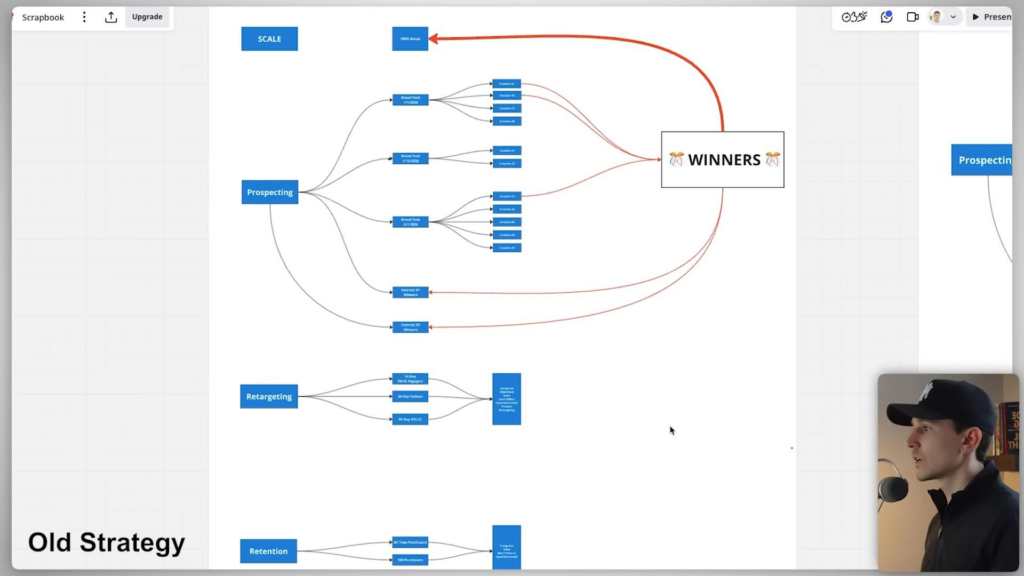
For three years before this shift, we ran a system built on three campaigns: prospecting, retargeting, and retention.
In prospecting, we launched broad creative packs every week or so, with individual creatives inside each pack. The best performers got pushed into a dedicated scaling campaign at the top of the account. Retargeting covered 14-day Facebook and Instagram engagers, 30-day site visitors, and 90-day add-to-carts. Retention hit existing customers, targeting all-time purchasers and 180-day purchasers.
It worked well. But that structure is no longer the move.
The M4 Method: What’s Different Now
The new approach is called the M4 method. On the surface it looks more complex, but it’s not overwhelming. If you were already running what we called the M3 method, this is a straightforward evolution.
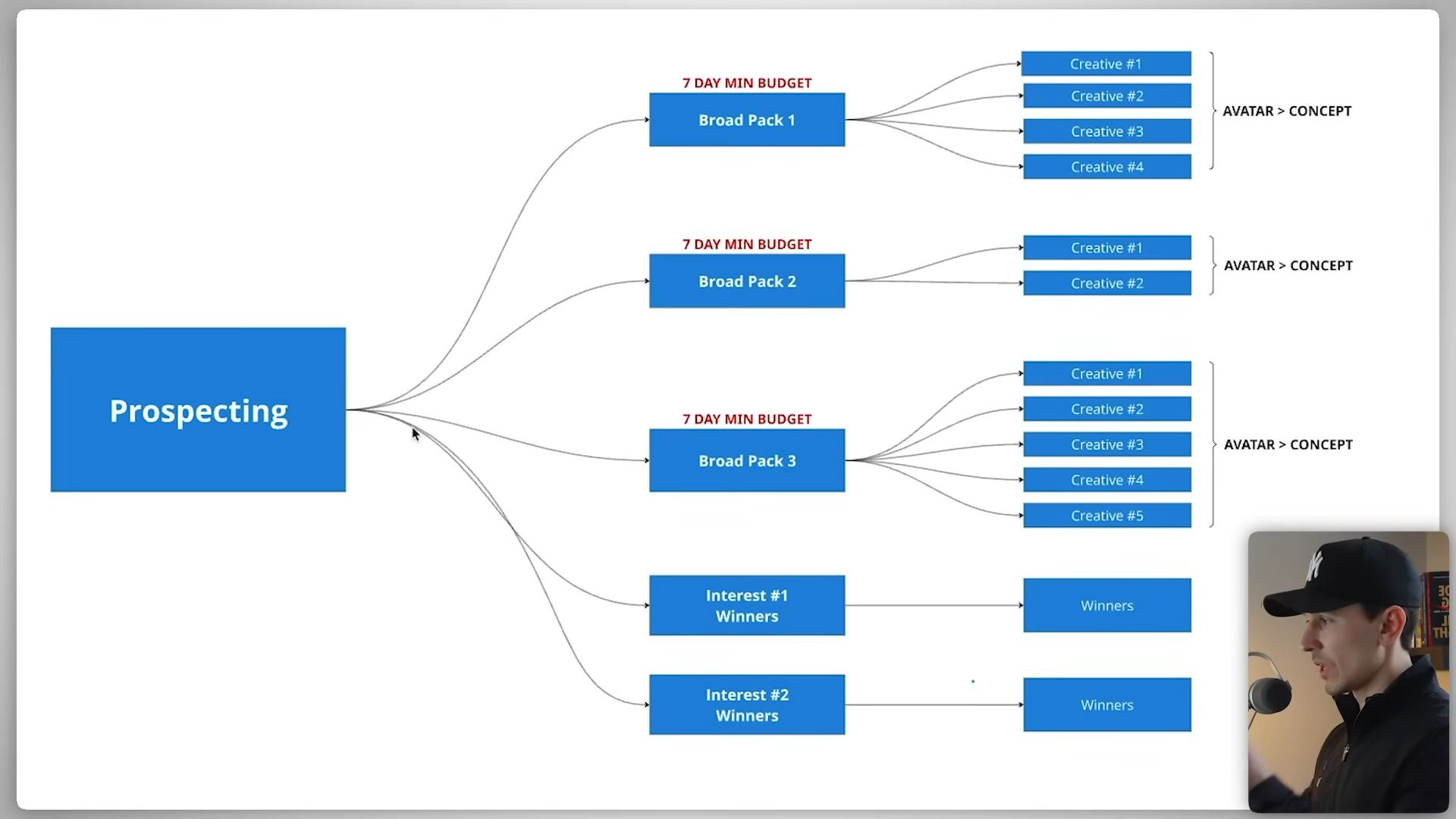
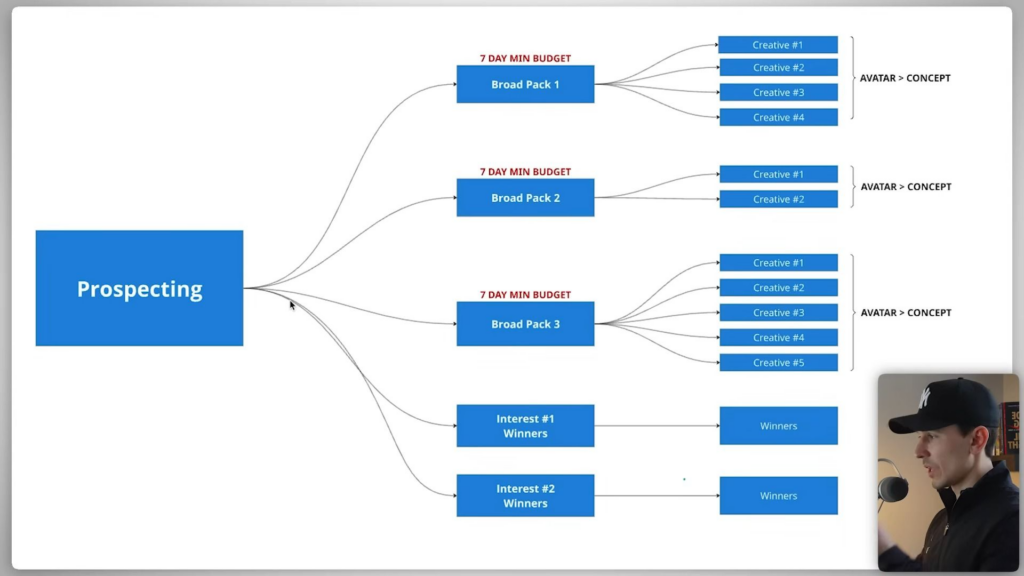
The core change is how we group creatives. Instead of launching broad packs with individual ads, we now group creatives by avatar or concept inside a CBO campaign with multiple ad sets, each with minimum budgets set.
Retention still exists. We still target all-time purchasers and 180-day purchasers and show them evergreen ads, sale ads, new products, and upsells and downsells.
The biggest shift? Retargeting is now optional. Whether you run it depends on the data in your account. You look at your audience breakdowns and make a judgment call from there.
How to Set It Up: The Prospecting Campaign
Here’s how we build the prospecting side step by step.
We set a CBO campaign with the budget at the campaign level. Bid strategy stays at highest volume or value. No budget scheduling changes needed.
Each ad set is a pack. You name it with your avatar name plus your concept name. For performance goal, use maximize number of conversions if everything you sell is the same price. Use maximize value of conversions if you need people to add multiple items to hit a free shipping threshold. You can run both in separate campaigns, but that’s a more advanced conversation.
Always set your conversion event to purchase. And make sure your Conversions API is set up properly. Without accurate data going into the pixel, you are genuinely stuck. The data is everything.
For attribution, we use 7-day click, 1-day engaged, 1-day view. We’ve beta tested this across multiple accounts with early access, and it gives your pixel the most signals long-term.
Ad Set Spending Limits Are a Big Deal
One of the most practical changes in this setup is ad set spending limits. When you launch your first pack, you don’t need to set a limit. But every time you launch a new pack after that, you set a minimum spend equal to your target CPA.
This matters most for accounts spending $1,000, $2,000, or $5,000 per day. It makes sure new ads get a fair shot at spend while your proven winners keep getting the bulk of the budget.
For audience settings, be honest with your minimum age. Don’t tell Facebook 21-plus if that’s not actually your restriction. Set your language to match the language your ads are written in. If your ads are in English, select English All, English UK, and English US. Don’t let Facebook auto-translate your ads into languages that don’t apply.
On placements, we let Facebook run wherever it wants. No manual placement selection. The analysis happens after the ads run, not before.
Interest Groups: A Small but Important Tweak
Interest groups work inside the same campaign structure but with one key difference. You duplicate a pack, rename it as your interest winner group, and run only your best-performing ads ever inside it. The point is to test the interest, not the ads.
The interest you pick should be adjacent to your brand, not a direct competitor. If you’re Nike, you don’t target Adidas or Reebok. Those are the same audience. Instead, you’d target something like Range Rover because it reaches a different but relevant group of people.
Keeping the Account Healthy as You Scale
As you keep launching packs, you might end up with 30, 40, even 50 active ad sets. That’s fine as long as your ad spend is growing alongside them. If your spend is flat and you’re not looking to push it higher, you’ll need to pause down weaker ad sets and ads so the account can breathe and perform.
This whole system is designed to give you visibility into where your money is actually going. When you increase your budget, you can see whether spend is going to new customer acquisition or getting wasted on existing customers who would have bought anyway. That kind of clarity is what makes the added complexity worth the effort.
This is not the simplest strategy to run. It takes real oversight. But it’s the exact strategy we’re rolling out across more than 100 businesses that are on pace to spend over $75 million in the next year.